Welcome back, my little Marie Kondo worshippers! Do I have an exciting new treat for you today! If, like me, your brain enjoys organisation, then you’re going to want to read on. I promise!
A brand-new inventory sorting and cleaning tool has been released in Second Life by Ripelle, and I’m excited to share some sneak peeks and my thoughts on it.
Let’s cover some basics first. This isn’t an in-world sorting system. You buy the licence in-world and then download a programme for Windows (Windows only at the moment, sorry Mac users!). It uses your UUID to access your inventory, allowing you to view everything on one handy screen.
Head on over to https://rippelle.com/cleaninventory where you can find the LM to buy the licence and the Windows download. The system is currently priced at L$1,299, or L$649 for group members. Joining the group costs L$250, so you may as well join and take advantage of the saving, in my humble opinion!
Once you’ve bought the item in-world, head somewhere you can rez it. This will automatically activate your licence, and then poof! Once that’s done and you see the following message, log out of SL.
[08:48] Clean Inventory activation box: Activating Clean Inventory for Magenta DeVinna…
[08:48] Clean Inventory activation box: Clean Inventory is now activated for your avatar. Open the app on your PC and sign in with this avatar. This box will now remove itself.
You’ll use your SL account to log into the programme, and you can’t be logged in to both places at once. So, make sure you log out first, or, like me, you’ll find yourself unceremoniously thrown out!
Next, you need to install the Windows app, which is easy as pie. There are instructions in the in-world notecard explaining how to do this, but honestly, it involves clicking a couple of buttons. Once it’s downloaded, you’re ready to log in.
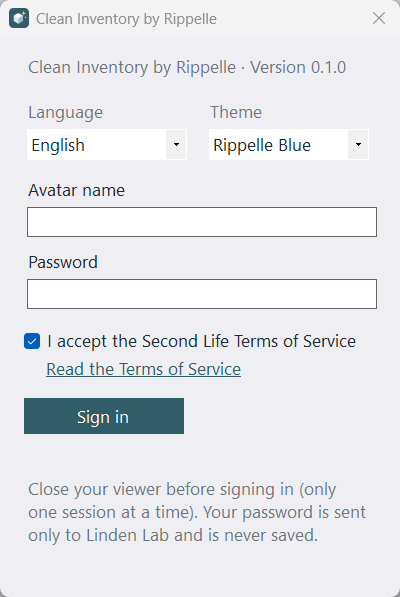
Enter your avatar name and password, agree to the terms, and you’re good to go. Essentially, you’re logging into SL here. If you have MFA set up for SL (and you really should!), a new box will appear at the bottom of the window asking for your MFA code once you hit “Sign in”. Seeing that extra security step was reassuring when logging in with my SL username.
Now for the best part! Once you’re logged in, your inventory will load, and when it’s finished, it’ll look something like this.
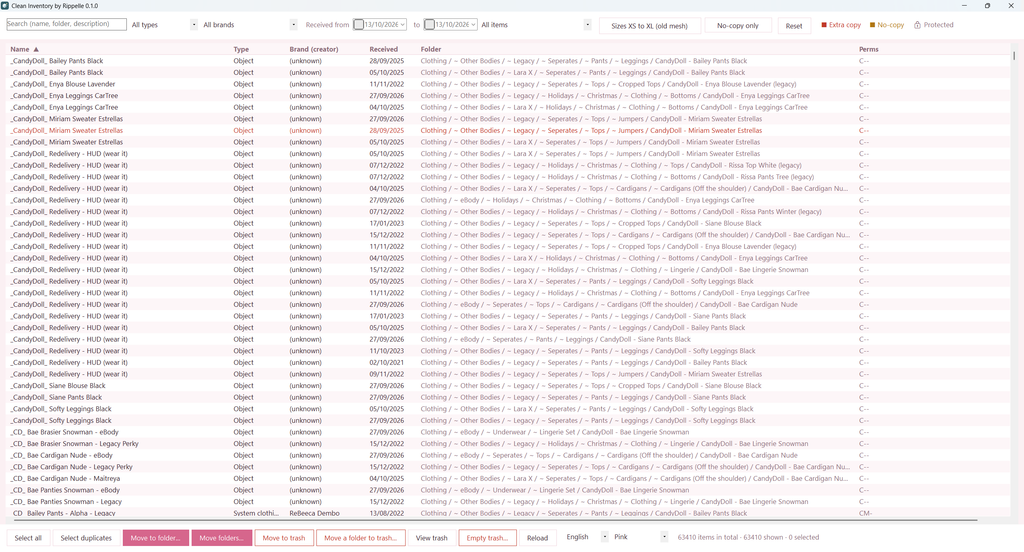
OK, not exactly like this, obviously, because this is my inventory, but you get the idea! 😁 Each column can be resized and sorted, which is extremely helpful. I’m already upset by the number of duplicate redelivery HUDs lurking in there. I definitely don’t need all those!
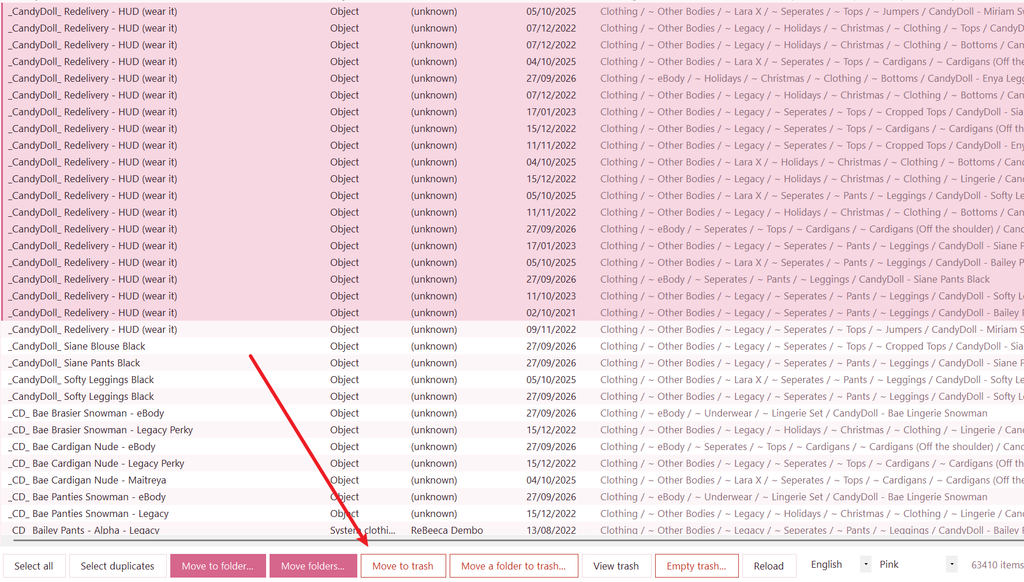
You can highlight the items you want to remove, hit “Move to trash”, and a confirmation window will pop up asking if you’re sure. Handy for impulsive deleters like me!
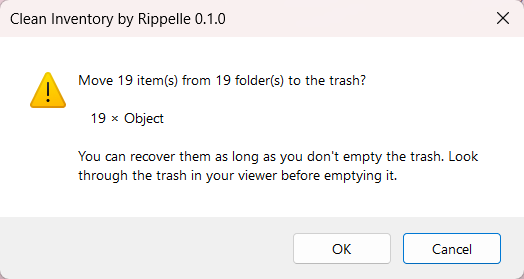
Aaaaaaand done! How easy was that?!
On to the next fun feature: Extra Copies! The system highlights duplicate items in your inventory, making them much easier to spot.
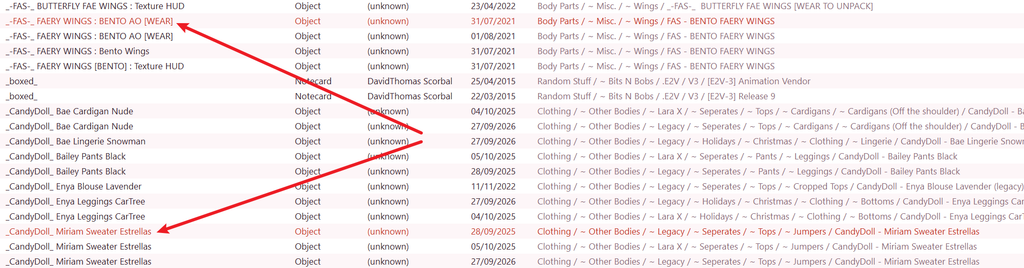
Now, I know what you’re thinking. “But Magenta, what if I have loads of no-copy gacha items in my inventory? I don’t want to delete those if I can’t copy them!”
Fear not, the system has thought of that! Duplicate items that are also no-copy are highlighted in a different colour, making them easy to distinguish. And, just in case you want to double-check before deleting anything, there’s a permissions column you can refer to.

So fun fact, in the last six months, I’ve decided to change bodies. Twice. That means I have a fair number of duplicate items rigged for different bodies. With this system, I can find items with the same name but a different suffix indicating which body they’re for. I can then delete them if I still have the original unpacker (after having to redeliver almost my entire inventory, please listen to me when I say KEEP THE UNPACKER!) or move them into a dedicated folder for each body.
Pretend I haven’t already done that, OK?

We’ve already covered deleting, so let’s try moving items instead. Highlight the ones you want to move, click the “Move to folder…” button, and a window will pop up asking you to choose a destination.
You’ll get a full list of the folders in your inventory, which you can either scroll through or search to find the one you need. You can even create a new folder directly from this window. Simple!
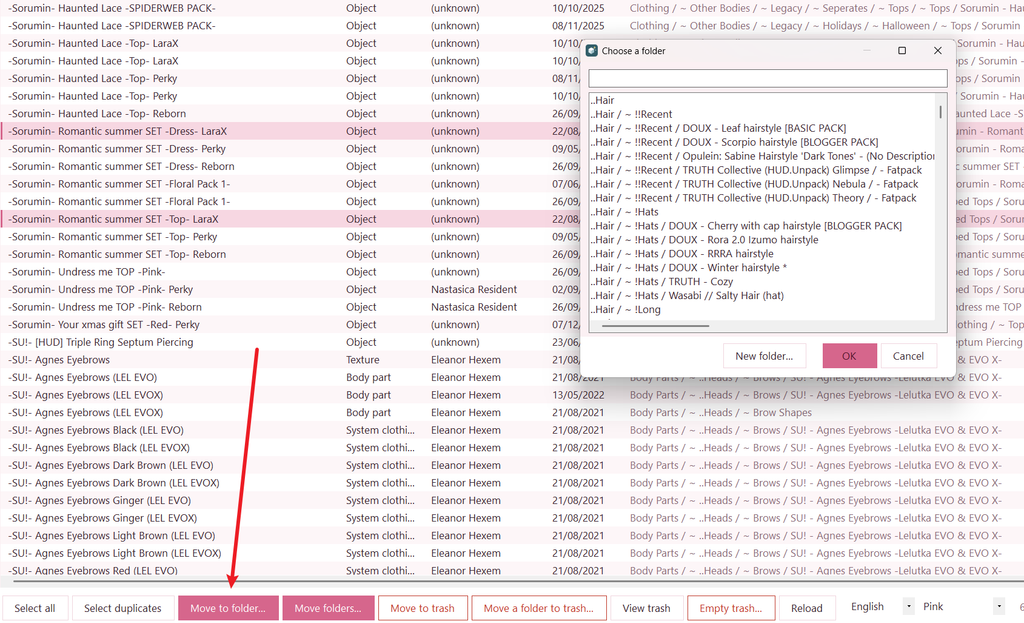
There are also several filtering options at the top of the window, which should make bulk deleting and moving much easier, especially when you’re first tackling your inventory. There are even buttons to select standard fitmesh-sized clothing and no-copy items specifically. A handy colour key at the top explains what the different colours mean, too.

This is by no means an exhaustive list of everything Clean Inventory can do, as I’ve only just started playing around with it. If you discover any other useful features, drop a comment below and share them so we can all benefit! I’d also love to know how many items you started with and how many you ended up with. Let’s see those inventory clear-outs!
Final thoughts
I genuinely like this system. I’m lucky enough to have a brain that enjoys organising, so, as I mentioned earlier, my inventory isn’t completely out of hand. However, I know that inventory management is something a lot of people struggle with, and I can see this being particularly useful for anyone who has thousands of items to sort through.
The setup is straightforward, the interface feels intuitive, and the price seems reasonable to me, particularly if you join the group for the discounted rate. Even after just a few minutes of exploring, I was getting to grips with how everything worked.
I haven’t explored every feature yet, but based on what I’ve tried so far, I can see this becoming a really useful addition to a lot of people’s Second Life routines. Anything that makes tackling an enormous inventory feel less daunting has to be worth a look, and Clean Inventory has certainly made a good first impression on me.
Now, if you’ll excuse me, I have a date with several thousand inventory items and a rather suspicious number of duplicate HUDs. Wish me luck!
Happy sorting, everyone!